A modern EasyPal alternative for digital SSTV
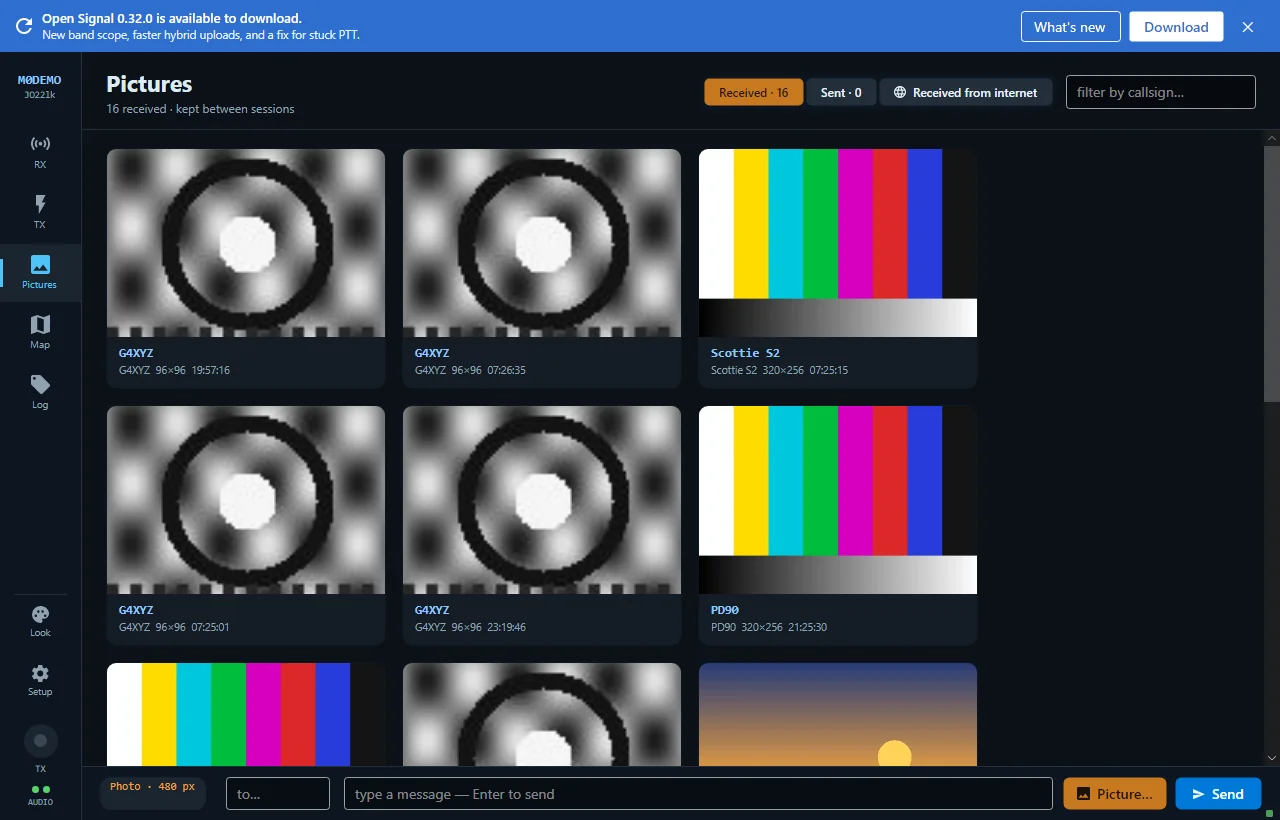
EasyPal put full-quality photo files on HF — but it has had no updates since its author became a Silent Key in 2014. Open Signal delivers the same byte-exact photo transfer on an actively-maintained waveform, and adds classic SSTV across six families and a self-filling logbook.
Is EasyPal still supported?
EasyPal was a landmark: a DRM-based mode that let amateurs send real image files — JPEGs, not analog frames — through a 2.4 kHz SSB channel, arriving pixel-perfect. But its author, Erik Sundstrup (VK4AES), became a Silent Key in October 2014, and the program has not been touched since. On modern Windows, with modern audio stacks, that leaves operators nursing a program frozen a decade ago.
Open Signal takes the idea forward. It sends the actual photo file byte-exact over the air on its own OFDM waveform with fountain forward-error-correction, so a picture rebuilds from any sufficient set of received bursts — and late-joining stations still complete. It is one self-contained executable, actively developed, and it does far more than image files.
What you keep — and what's better
- Real files over radio. Send a JPEG and it arrives byte-exact, exactly the EasyPal experience.
- Same interface, same radio. Anything that ran EasyPal or PSK31 — a Digirig, a SignaLink, USB-audio rigs — runs Open Signal.
- Now with classic SSTV too. Six families (Martin, Scottie, Robot, Wraase, PD and MMSSTV's MP/MR) with automatic mode detection — EasyPal never did analog SSTV.
- Hybrid cloud mode. Tick one box to send only a cloud URL: full quality in about five seconds of airtime when both ends have internet.
- A logbook that fills itself. Every exchange is logged with callsign, CAT frequency, mode and grids — pushed live to Wavelog/Cloudlog, eQSL and UDP ADIF.
Open Signal vs EasyPal vs MMSSTV
Where EasyPal covers digital image files and MMSSTV covers analog SSTV, Open Signal does both — and stays maintained.
| Feature | Open Signal | EasyPal | MMSSTV |
|---|---|---|---|
| Still maintained | Yes — active development (v0.34.1) | No — author SK since 2014, no updates | No — legacy freeware, unchanged for years |
| Digital (error-corrected) pictures | Yes — OFDM + fountain FEC | Yes — DRM waveform | No — analog SSTV only |
| Classic analog SSTV | Yes — six families incl. MP/MR, auto-detect | No | Yes — the reference implementation |
| Send the real photo file byte-exact | Yes | Yes | No |
| Send full quality via internet + radio URL | Yes — hybrid cloud mode (~5 s) | No | No |
| Extra software needed | None — one self-contained .exe | None, but DRM setup is fiddly | Sound-card + often virtual audio cables |
| Self-filling logbook + eQSL/Wavelog/ADIF | Yes | No | No |
| CAT rig control & auto frequency logging | Yes — Kenwood/Elecraft/Yaesu/Icom | No | No |
One honest caveat: Open Signal is not wire-compatible with EasyPal. To exchange pictures you both run Open Signal. True EasyPal/HamDRM interop would require a DRM modem, which is on the roadmap rather than in the product today.
EasyPal & Open Signal — questions
Is EasyPal still being developed?
No. EasyPal was written by Erik Sundstrup (VK4AES), who became a Silent Key in October 2014. There have been no updates since, so it receives no fixes for new versions of Windows, audio drivers or codecs.
Where can I still download EasyPal?
Copies are still mirrored on amateur radio sites and in software archives, and it will install on Windows 10 and 11 — but nothing about it has been maintained since 2014, and it needs a DRM modem to work at all. If you want to try it for historical interest, it is findable. If you want something you can rely on for a scheduled net, it is not the right tool any more.
Can Open Signal decode EasyPal transmissions?
Not on the air. EasyPal uses a DRM (Digital Radio Mondiale) modem; Open Signal uses its own OFDM waveform. Open Signal gives you the same result — the actual photo file, byte-exact — on a more robust, actively-maintained waveform, plus classic SSTV that EasyPal never had.
Do I need to change my radio or interface to switch?
No. If your sound-card interface (Digirig, SignaLink, or a rig with USB audio) worked for EasyPal or PSK31, it works for Open Signal. Open Signal is a single self-contained Windows executable — nothing else to install.
More about Open Signal
Bring digital pictures back to your shack
Open Signal picks up where EasyPal left off — actively maintained, one executable, with SSTV and logging built in.