How to send pictures over ham radio
Sending an image over the air is a five-minute job once you know the pieces: a radio, a sound-card interface, a calling frequency, and software to turn the picture into tones. Here's the whole process, end to end, using Open Signal.
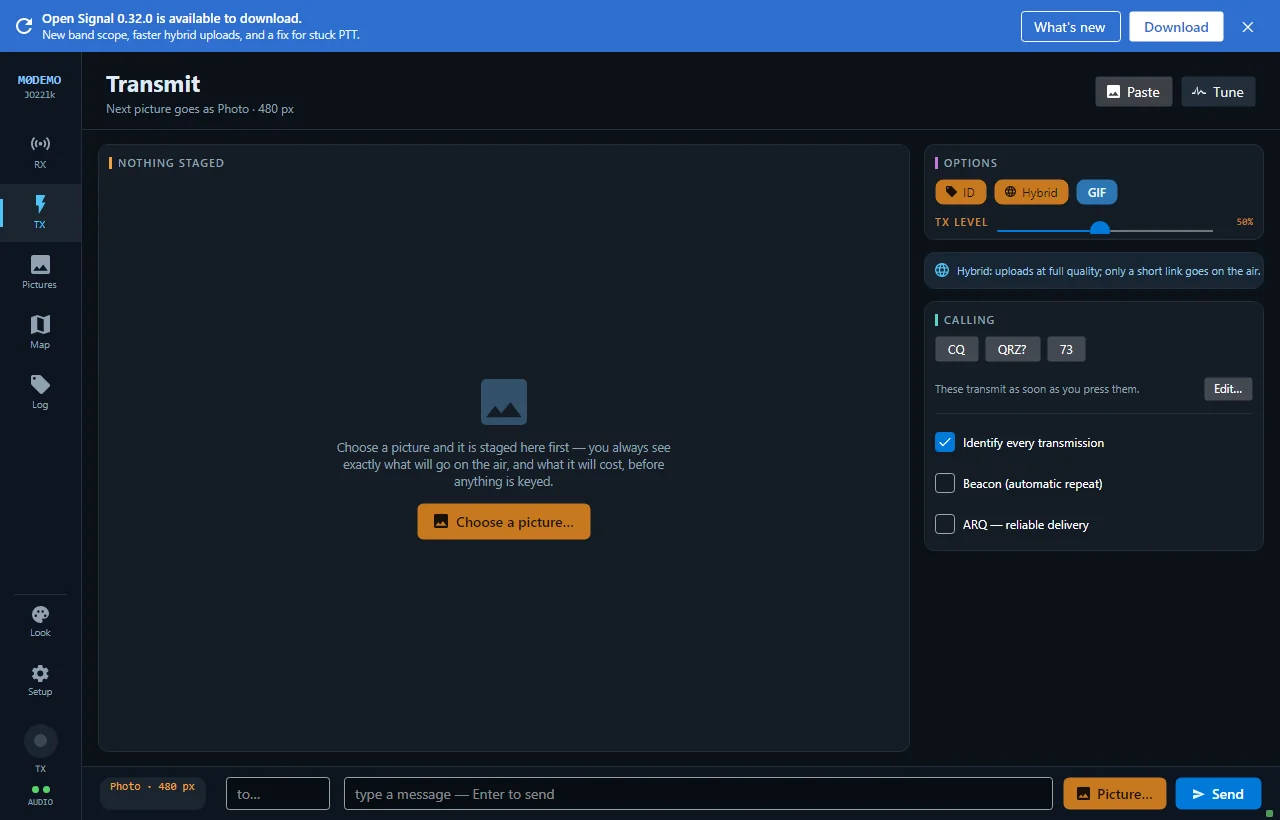
Send your first picture in five steps
- 01
Connect the radio to your PC
Use a sound-card interface — a Digirig, a SignaLink, or any modern rig with built-in USB audio (an IC-7300 and the like). That single connection carries transmit and receive audio; a COM port adds CAT frequency logging and PTT if you have one.
- 02
Run Open Signal and enter your callsign
Open Signal is one self-contained executable — double-click it. On first launch the Station setup window opens: enter your callsign and Maidenhead grid square, pick your audio devices, and choose a PTT method (SerialRts for a Digirig/SignaLink, CAT, or VOX).
- 03
Tune to an SSTV calling frequency
Set the rig to upper sideband and tune to a common SSTV frequency — 14.230 MHz is the primary 20-metre picture calling frequency and a good place to start. Watch the RX LEVEL bar under the waterfall: it should dance with band noise without ever showing the red CLIP flag.
- 04
Pick a mode and choose a picture
In the TRANSMIT panel, tap a mode chip — each shows its airtime and resolution up front. Click Choose a picture (PNG, JPEG, BMP, GIF or PGM), and a READY TO TRANSMIT card previews the exact image, size and airtime that will go on air.
- 05
Press Transmit
Hit the amber Transmit button. PTT keys, the status line tracks progress, and the header TX chip lights amber. Nothing goes on air until you press it — and Cancel discards without transmitting.
Analog SSTV, digital, or the real file?
Open Signal gives you four ways to send the same picture. Which you pick depends on who is receiving and what you care about:
- Classic SSTV when the other station runs MMSSTV or any SSTV app — maximum compatibility.
- Open Signal digital for Open Signal to Open Signal work — best quality per second, and it survives fading that would shred an analog frame.
- The photo file when you want the real, full-resolution image to arrive exactly as it left — entirely over RF, no internet needed.
- Hybrid when both ends have internet and you want full quality for about five seconds of airtime.
See the SSTV modes reference for a mode-by-mode breakdown of resolution and airtime.
Getting your levels right
Good decoding is mostly about clean audio. Set it once and forget it:
- The RX LEVEL bar should sit visibly above zero and move with the audio.
- If the red CLIP flag appears, turn the radio's AF gain or the interface pot down — clipped audio ruins decoding.
- Band signals should show as bright traces on the waterfall. A black waterfall means the wrong capture device is selected.
On transmit, Open Signal peak-normalises each burst and keys PTT with a lead-in and hang, so you drive the rig cleanly without riding the gain.
Sending pictures over ham radio — FAQ
What frequency is used for SSTV pictures?
14.230 MHz upper sideband is the main 20-metre SSTV calling frequency. Other bands have their own activity; 14.230 is the usual starting point on HF. Pictures typically take about a minute to send.
What equipment do I need to send pictures over ham radio?
A licensed transceiver, a computer, and a sound-card interface between them (Digirig, SignaLink, or a rig with USB audio). With Open Signal you also just need your callsign — there is no extra software to install.
How long does it take to send a picture?
It depends on the mode. Fast SSTV modes like Robot 36 take about 36 seconds; detailed modes run several minutes. Open Signal's own digital mode sends a 320×240 colour picture in under a minute, error-corrected, and its hybrid cloud mode sends full quality in about five seconds of airtime.
Can I try it without transmitting?
Yes. Running OpenSignal.App.exe with gui --preview starts a scripted demo station — incoming messages, SSTV receptions painting in, a photo file — so you can explore everything before you key a radio.
More about Open Signal
Your first picture is minutes away
Enter your callsign, tune to 14.230, pick a mode, and press Transmit — or rehearse the whole flow with the built-in no-radio demo.