DOCThe map & other operators
Profiles of other operators
Click any callsign for the operator's profile: who they are, their station, distance and bearing from you, and the pictures they have published.
Click the person icon on any HEARD row, or a marker on the map, and you get everything the network knows about that operator.
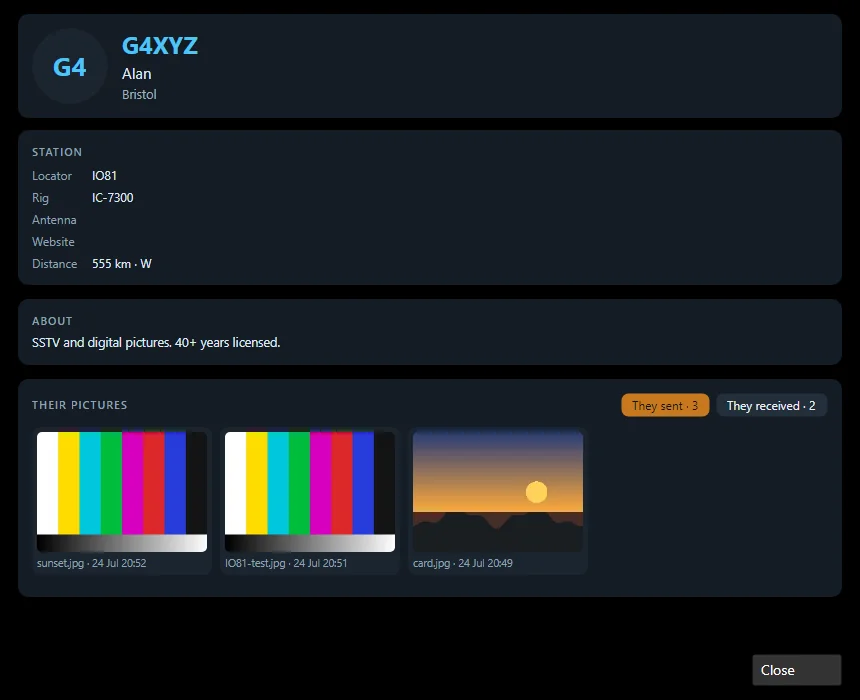
What’s on a profile
- Who they are — callsign, name, QTH, and their avatar if they’ve set one.
- Station details — locator, rig, antenna, website, and the distance and bearing from your station to theirs (worked out from the two locators).
- About — their own blurb.
- Their pictures — the gallery they’ve published, split into They sent and They received, with counts on each tab. Animated GIFs play. This is the same data that feeds the Received from internet tab, organised per operator.
Empty pictures?
“Has not published any pictures” means exactly that — publishing is a per-operator choice, and some turn it off. It isn’t a fault at your end.
The other direction
What others see when they open your profile is up to you — see Your own profile.
New to Open Signal?
Start with the overview — what it does, the honest status, and how the pieces fit together.