Your picture galleries
The Pictures section keeps what you have received, what you have sent, and what the wider network is hearing — with callsign and band filters.
The Pictures section keeps everything: what you’ve received, what you’ve sent, and what the wider network has been receiving.
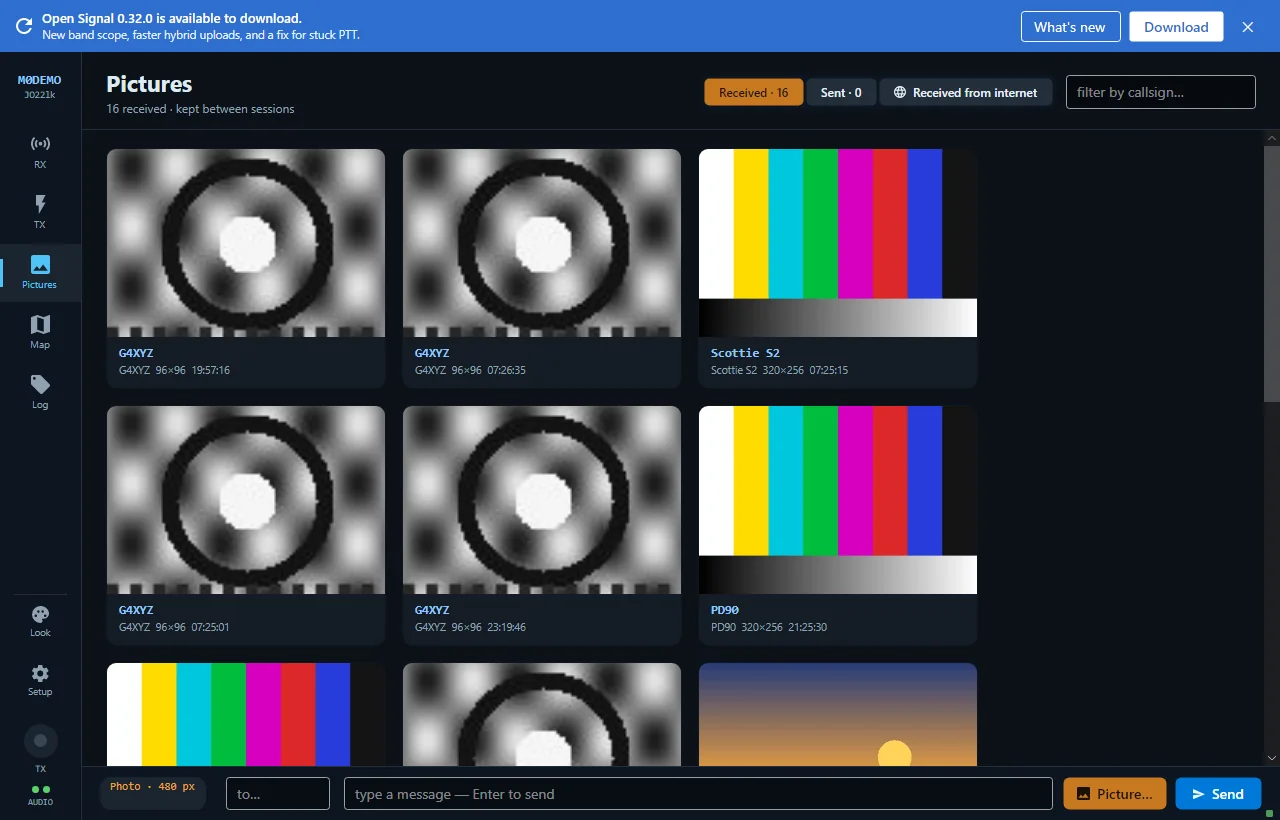
The tabs
- Received — every picture that has arrived at your station, newest first.
- Sent — every picture you’ve transmitted.
- Received from internet — pictures other stations copied off-air and published. See the internet feed.
Received and Sent persist between sessions (the app keeps the last 300 of each). Cards show the callsign and time; animated GIFs play right on the card.
Filtering
Filter boxes narrow the view by callsign and frequency/band — handy after a busy weekend.
Clicking a card
Opens the full-size viewer, with Copy (clipboard) and Open folder (the received directory on disk, where every incoming picture is also saved as a normal image file with a timestamp-callsign filename).
Publishing
By default your sent and received pictures are also published to your operator profile so others can browse them — that’s what fills the internet feed. It’s opt-out: turn “publish my pictures” off in Settings and everything stays local. See Your own profile.
New to Open Signal?
Start with the overview — what it does, the honest status, and how the pieces fit together.