Send your first picture
Stage a picture, see its exact cost in airtime before anything keys, and press Transmit. Nothing goes on air until you have seen what will be sent.
Nothing transmits until you’ve seen exactly what will go out and pressed Transmit — staging first is the rule everywhere in Open Signal.
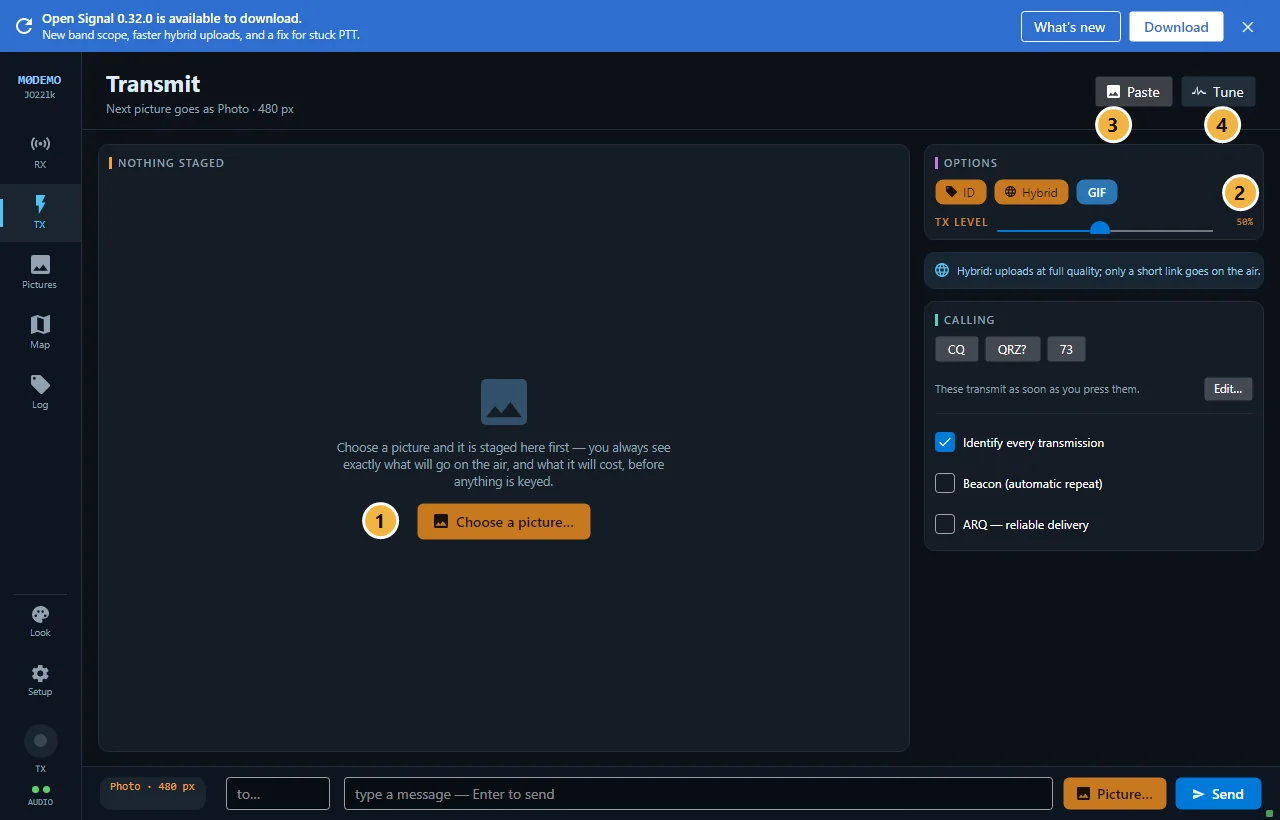
The short version
- Open TX and press Choose a picture… (1) — or drag a file anywhere onto the window, or press the Paste button (3) with an image on the clipboard.
- The picture stages with a preview and the cost: size, kilobytes, and how long it will take on air. Change how it goes out in the options column (2) — see Send modes explained.
- Press Transmit. Done.
While staged you can edit it — crop, rotate, colours, caption — and the preview shows the callsign stamp exactly as it will appear.
Where the staged picture lives
Once staged, the picture belongs to the station, not the screen: leave TX and a READY TO TRANSMIT strip follows you above the composer, so you can fire it from anywhere. After sending, the picture stays staged — send it again to another station, or press Cancel to clear it.
If Transmit is refused
The bar tells you why instead of greying out — most commonly a picture is mid-decode (keying now would destroy it for everyone listening). Wait for it to finish, or see Common problems.
Also on this screen: Tune (4) keys the 1750 Hz tuning tone.
New to Open Signal?
Start with the overview — what it does, the honest status, and how the pieces fit together.